Page 1 of 1
The average depth is not correct in the DiveLogDT and iOS DiverLog
Posted: Sun Sep 11, 2022 3:53 am
by bigplume
I am using Shearwater Perdix, I have configured the "End Dive Delay" option to 600 seconds, because in some case, I need to float up to complete some tasks and then sink down, and I don't want the two parts to be recorded as two separate dives.
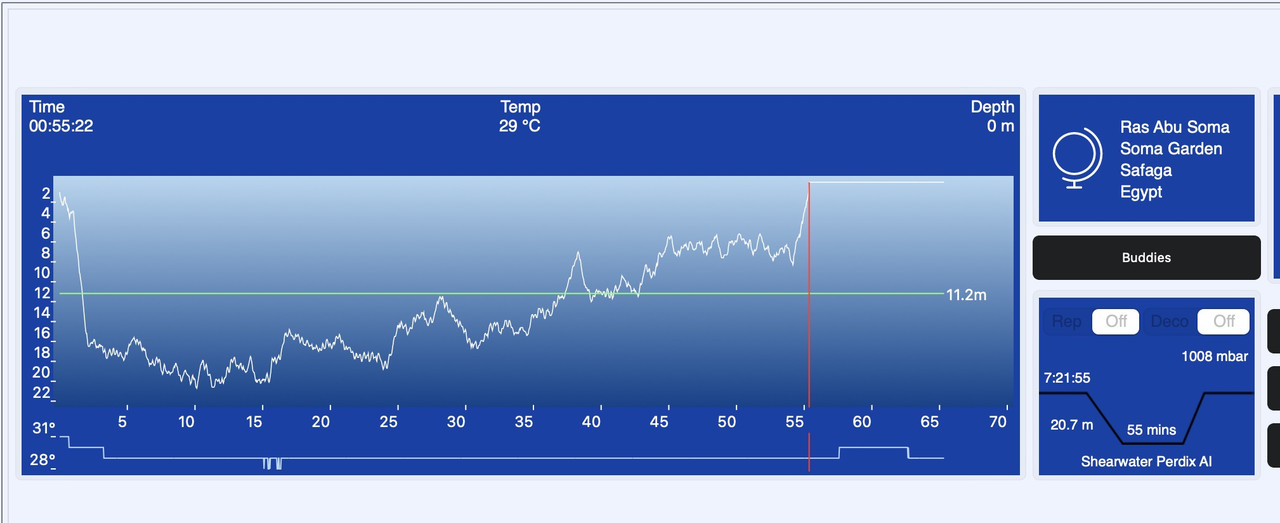
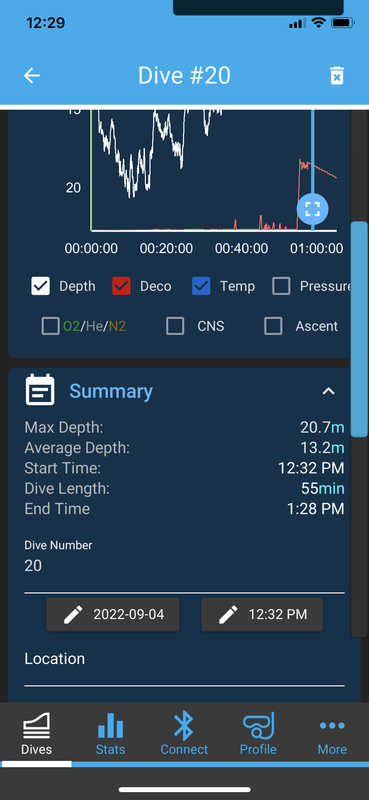
The configuration means at the real end of each dive, my computer keeps recording 10 minutes with 0 meter depth. Shearwater knows the final 10 minutes part in not a real dive, and not counted in total dive time as well as other calculations, but this is a problem for DiveLog. As you can see from the following screenshot, the depth of the last 10 minutes is 0, the average depth is 11.2m, however from the shearwater software it is 13.2m. But the DiveLog more or less knows my REAL dive time because it shows as 55 minutes instead of 65 minutes, so I think DiveLog should be able to calculate the correct average depth. The average depth is important for me to calculate SAC / RMV, now I need to manually modify average depth in DiveLog according to shearwater app number, can you fix this problem? Thanks.
Re: The average depth is not correct in the DiveLogDT and iOS DiverLog
Posted: Sun Sep 11, 2022 1:10 pm
by support
Hello bigplume,
Yes, this is a problem for the Shearwater dive computers. Although they know what you have set the "End Dive Delay" to, we don't. You'll see that the total dive time is correct as that is what is being reported by the dive computer, however "by default" we go through all the samples to determine average depth.
There are 2 (or 3) options. First, both Dive Log for iOS and DiveLogDT on macOS have a Preference called "Ignore Shallow Samples for Average Depth". If you turn this preference on, it will ignore any shallow samples, both at the end of the dive, and any in the middle too and you should get a different calculation for average depth. In Dive Log it is on the Settings tab and in DiveLogDT it is under "Profiles" in the Preferences Window.
Second, you can edit and set your Average Depth to be what you want it to be in DiveLogDT. Just go into Edit mode and set it to whatever value you want it to be and the SAC rate calculations will use that. You can match what the Shearwater App does if you want to.
And lastly, "if you want to", you can set the "End Dive Delay" to something more realistic. Then, if something happens that 1 dive get's recorded as 2 separate ones, you can use DiveLogDT or DiveLog to "append" the second dive to the first dive, thereby making one dive in your logbook.
Let us know if you have any questions,
Cheers,
Janice
Re: The average depth is not correct in the DiveLogDT and iOS DiverLog
Posted: Mon Sep 12, 2022 12:08 am
by bigplume
Hello,
Thanks for the reply, I have two questions:
1. Is it possible to provide a function to manually cut / clip a dive? for example in DiveLogDT on the data graphs add a right click menu to delete the following dive data from the current selected time point, or even better to select a range by mouse dragging and delete.
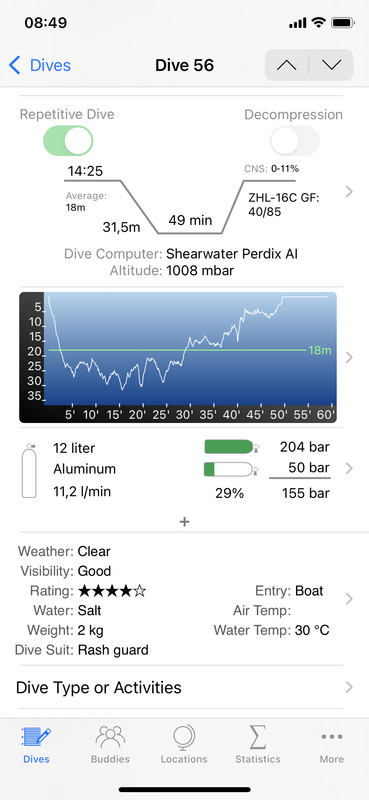
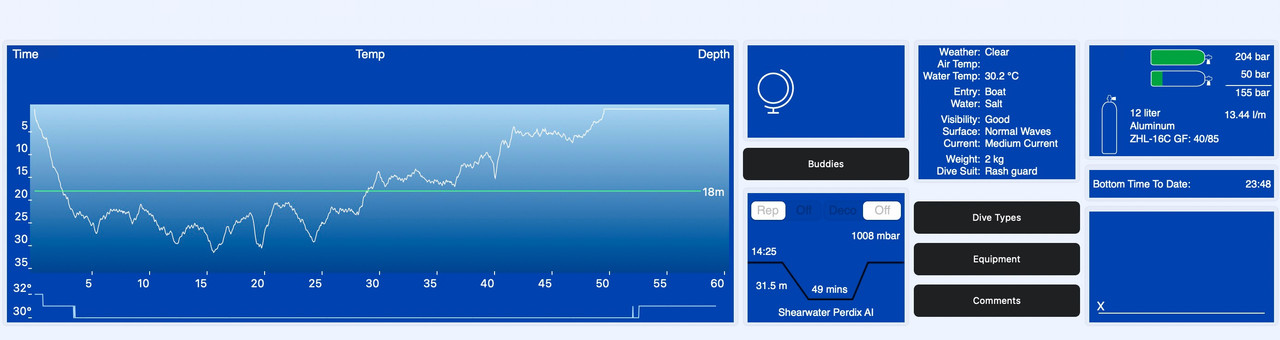
2. I have modified my average depth in DiveLogDT and sync back to iOS DiveLog, but for the same dive, the RMV values in two apps are different, as you can see in the following images. I didn't modify either side after synchronization. According to the RMV formula I found
RMV = Cylinder size in liter * (total bar used / total dive time) / (average or maximum depth in ATA)
the DiveLogDT value is correct, why the two apps show different value?
Re: The average depth is not correct in the DiveLogDT and iOS DiverLog
Posted: Mon Sep 12, 2022 9:45 am
by support
bigplume wrote: ↑Mon Sep 12, 2022 12:08 am
1. Is it possible to provide a function to manually cut / clip a dive? for example in DiveLogDT on the data graphs add a right click menu to delete the following dive data from the current selected time point, or even better to select a range by mouse dragging and delete.
Yes. This has been on my "to do" list for some time and in fact may happen soon. It probably won't be a "drag" and delete because the drag function is already in use to select a portion of the dive for analysis and I'd like to keep it there. User's can already manually Edit the dive profile, (Right click on the profile in Edit mode), and so it'll go in there. I just don't yet have the ability to delete samples but would like to add it.
bigplume wrote: ↑Mon Sep 12, 2022 12:08 am
2. I have modified my average depth in DiveLogDT and sync back to iOS DiveLog, but for the same dive, the RMV values in two apps are different, as you can see in the following images. I didn't modify either side after synchronization. According to the RMV formula I found
RMV = Cylinder size in liter * (total bar used / total dive time) / (average or maximum depth in ATA)
the DiveLogDT value is correct, why the two apps show different value?
Could you create a logbook file with this one dive in it and email it to us at our support email address? We'll take a look and see why there is a difference.
Thanks!
Janice
Re: The average depth is not correct in the DiveLogDT and iOS DiverLog
Posted: Mon Sep 12, 2022 12:42 pm
by bigplume
Could you create a logbook file with this one dive in it and email it to us at our support email address? We'll take a look and see why there is a difference.
I have sent an email to
support@moremobilesoftware.com