Hello ...
I use Dive Log on my iPhone and my IpadMini and am very satisfied with the program
I have asked a question at to Diving Log and Sven said you're the right person for it ...
oh so - Happy New Year ...
read my way recently saw from even so:
http://i146.photobucket.com/albums/r257 ... xhk1y9.jpg
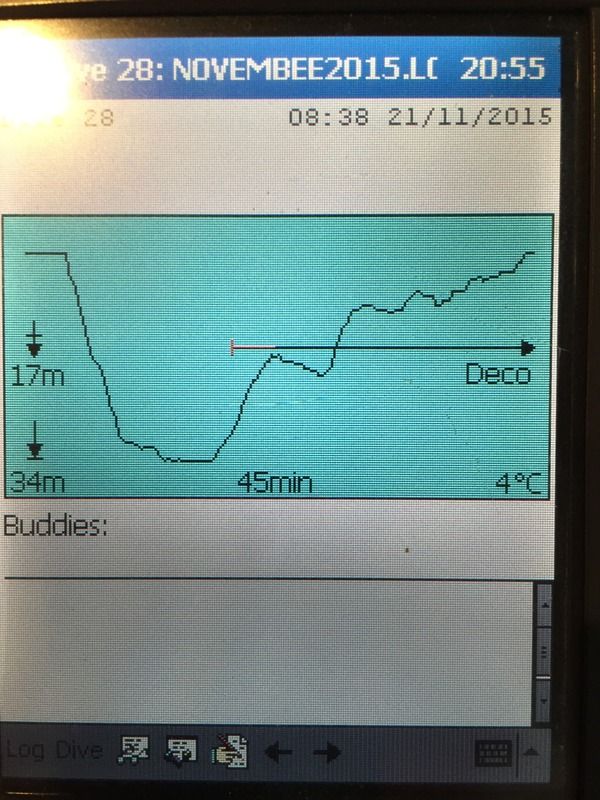
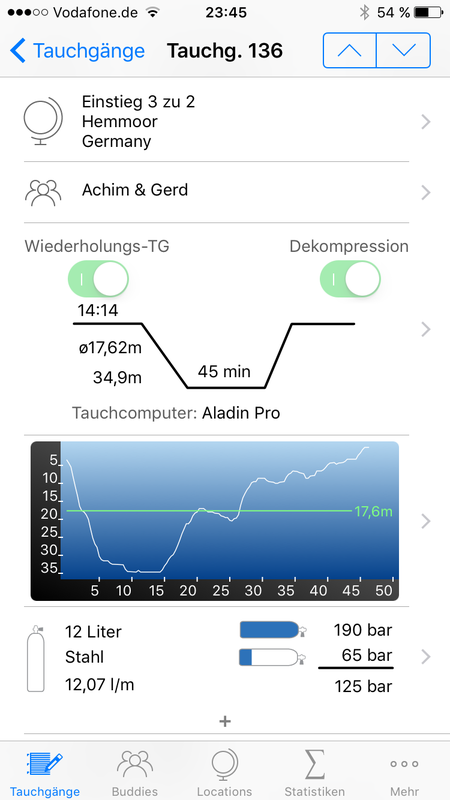
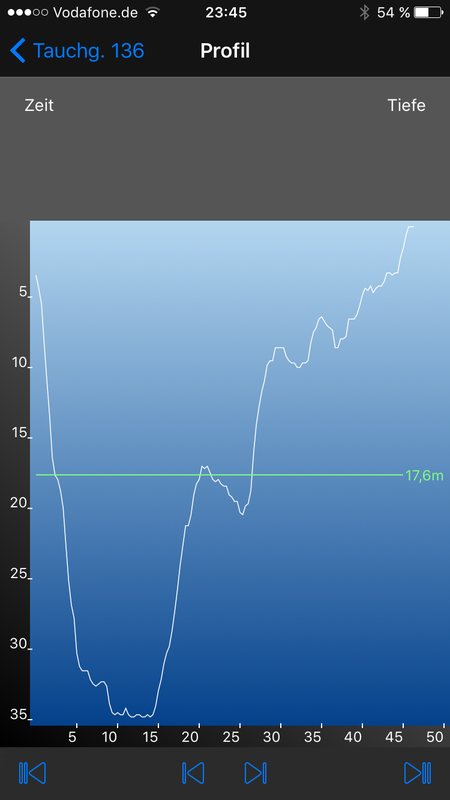
hmm could not let some values like Deco View the profile directly as shown here? :
http://i146.photobucket.com/albums/r257 ... l4iuzn.jpg
would look super ...
About answer I would be delighted
pierre
dive profile - deco
Re: dive profile - deco
Hi Pierre, Happy New Year to you as well!
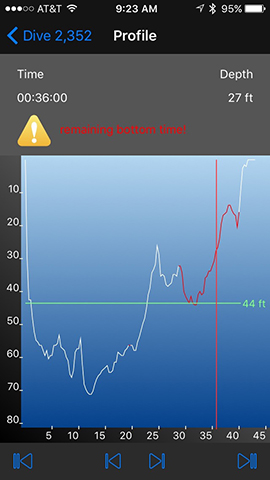
Dive Log does display additional information (warnings, etc.) downloaded from your dive computer on the profile graph by marking the appropriate sections in red. So if you have a portion of your dive that your dive computer reported as being in "deco" then that section of the profile will be highlighted in red. You can get more details about the profile and the specific meaning of the red section by tapping on the initial profile view (double tapping on iPad) and the tapping on the red section. For example, in this case, the dive computer has reported a "remaining bottom time" warning for part of the dive:
The ability to display this information depends on your specific dive computer and how it's data was imported into Dive Log. If the decompression information was not captured by the import of the dive computer, then the information will not be available for Dive Log to display. If you are not seeing the information that you expect when you view the details of the profile, let me know which dive computer are you downloading (is it the Aladin in the image you pointed to) and how are you getting the data from the dive computer into Dive Log (are you downloading the computer using Diving Log 6.0 and syncing to Dive Log) and we can look at what might be happening that is causing the deco information to not display.
Cheers,
Greg
Dive Log does display additional information (warnings, etc.) downloaded from your dive computer on the profile graph by marking the appropriate sections in red. So if you have a portion of your dive that your dive computer reported as being in "deco" then that section of the profile will be highlighted in red. You can get more details about the profile and the specific meaning of the red section by tapping on the initial profile view (double tapping on iPad) and the tapping on the red section. For example, in this case, the dive computer has reported a "remaining bottom time" warning for part of the dive:
The ability to display this information depends on your specific dive computer and how it's data was imported into Dive Log. If the decompression information was not captured by the import of the dive computer, then the information will not be available for Dive Log to display. If you are not seeing the information that you expect when you view the details of the profile, let me know which dive computer are you downloading (is it the Aladin in the image you pointed to) and how are you getting the data from the dive computer into Dive Log (are you downloading the computer using Diving Log 6.0 and syncing to Dive Log) and we can look at what might be happening that is causing the deco information to not display.
Cheers,
Greg
Re: dive profile - deco
Hello ...
Thank you for your quick response ...
I load the data directly into the PC into Diving Log 6.0 ...
as a dive computer I have the Aladin ...
Diving Log 6.0 in the Deco Time will also be displayed below the dive profile is displayed as a timeline ...
here a dive that was me appear as Deco :
http://i146.photobucket.com/albums/r257 ... edzhue.png
http://i146.photobucket.com/albums/r257 ... xjnebc.png
als Beispiel ein Tauchgang mit einer Aufstiegswarnung :
http://i146.photobucket.com/albums/r257 ... wr6yxy.png
greeting
pierre
Thank you for your quick response ...
I load the data directly into the PC into Diving Log 6.0 ...
as a dive computer I have the Aladin ...
Diving Log 6.0 in the Deco Time will also be displayed below the dive profile is displayed as a timeline ...
here a dive that was me appear as Deco :
http://i146.photobucket.com/albums/r257 ... edzhue.png
http://i146.photobucket.com/albums/r257 ... xjnebc.png
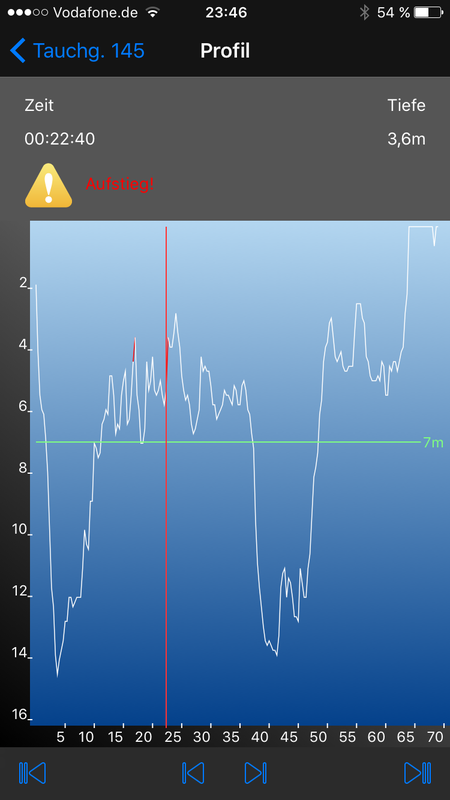
als Beispiel ein Tauchgang mit einer Aufstiegswarnung :
http://i146.photobucket.com/albums/r257 ... wr6yxy.png
greeting
pierre
Re: dive profile - deco
Hi Pierre,
Diving Log 6.0 and Dive Log represent the deco information differently on the display (we don't have the "timeline" display for warning that Diving Log has primarily due to space constraints on the Phone), but the Deco information should be displayed asa red section of the profile display. Could you send me a copy of your Diving Log 6.0 logbook (the ".mdb" file from your PC) so that I can properly investigate why you might not be seeing the deco information displayed? You can just email the file to our support email address (support 'at' moremobilesoftware 'dot' com). I'll take a look at it and get back to you with some additional information.
Thanks!
Greg
Diving Log 6.0 and Dive Log represent the deco information differently on the display (we don't have the "timeline" display for warning that Diving Log has primarily due to space constraints on the Phone), but the Deco information should be displayed asa red section of the profile display. Could you send me a copy of your Diving Log 6.0 logbook (the ".mdb" file from your PC) so that I can properly investigate why you might not be seeing the deco information displayed? You can just email the file to our support email address (support 'at' moremobilesoftware 'dot' com). I'll take a look at it and get back to you with some additional information.
Thanks!
Greg